

For organisations & sponsors
Local · Read a challenge results report
Updated 20 Nov 2026
This guide helps sponsors read the results report of a local challenge, and print it or save it as a PDF.
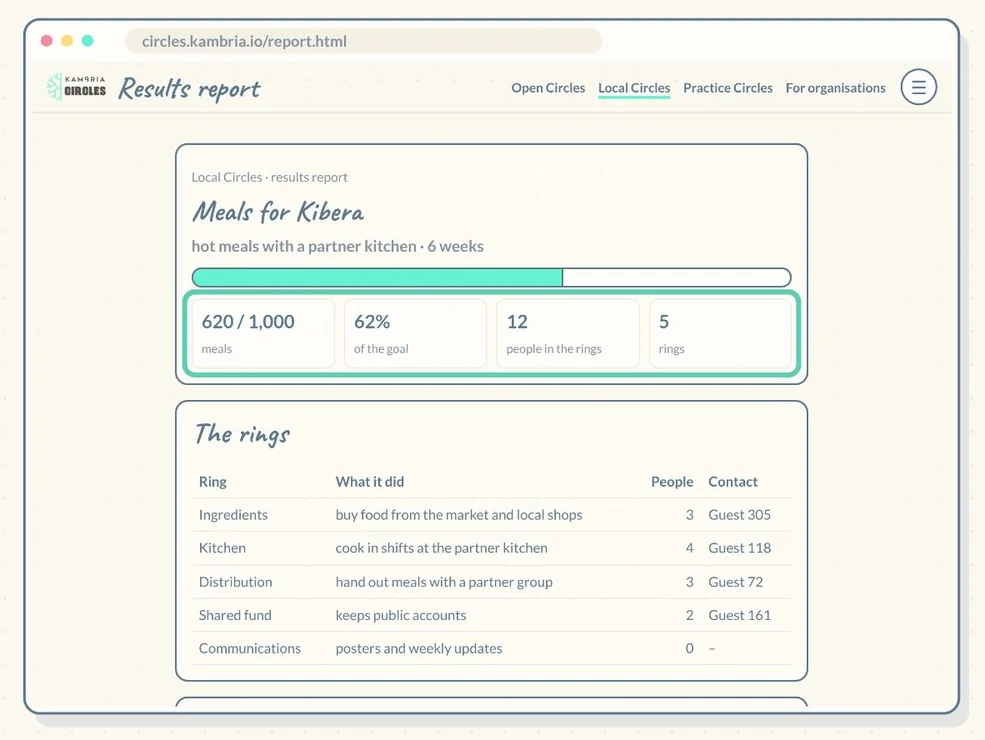
Steps
- Open the challenge page and tap Results report. Or open the report link you were given (circles.kambria.io/report.html?c=…). The example report is at circles.kambria.io/report.html.
- At the top, read the title, the goal and the progress bar: how much was done, of the goal (or Reached), the number of people in the rings and the number of rings.
- Read The rings: each ring, what it did, how many people and its contact (a guest number).
- Read Progress: date, how much was added, what happened, and by whom (a guest number or "Circles team").
- If the challenge is funded by measured results, read Results for funders: units committed, reported and verified, how results are checked, and the milestones with the day each was reached. In Progress, verified updates end with "✓ verified".
- Read Shared fund: In, Out, Balance, and each entry with date, what it was for and the amount. "Every entry has a receipt on the challenge page."
- Read Supported by: the sponsors, with their names and small logos.
- Tap Print / Save as PDF. In the print window, choose "Save as PDF" or a printer.
- Tap Back to the challenge to open the challenge page and its receipts.
Good to know
- The report shows only what the challenge page already shows, plus totals. No names of people, no emails.
- "Sponsors support the organisation doing the work directly. This report does not show amounts."
- The printed version fits A4 and has no menu or buttons. The bottom line says when and from which page it was made.
- The example report has an Example label: "This is an example to show what a report looks like. The numbers are not real."
- Content may show in another language if you chose one in ☰ Menu → Language.
If something goes wrong
- "This challenge can’t be found." The link is wrong or the challenge is hidden. Ask the Circles team at circles@kambria.io.