

Practice Circles · Practice Circles · Learners
Village hall: vote or object
Updated 20 Nov 2026
This guide helps learners vote on a proposal or raise an objection.
Before you start
- You are a member of the village and the proposal is still Open.
Steps
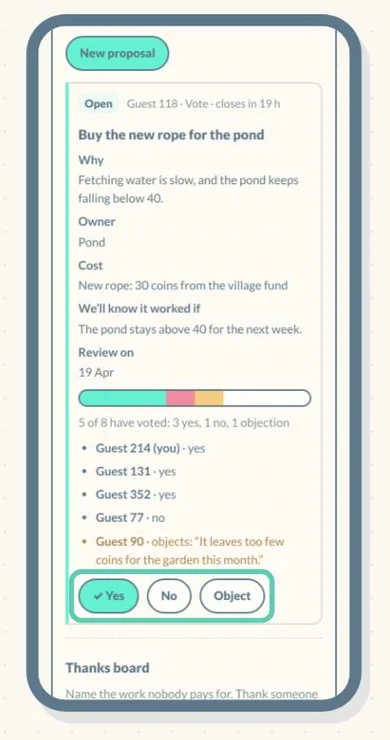
- Scroll to Village hall in your village. Each open proposal shows the author, Vote or Consent, and "closes in …".
- Read the parts: Why, Owner, Cost, We’ll know it worked if and Review on.
- Tap Yes or No. Your choice shows a ✓.
- If the proposal would harm the village, tap Object. Type a short reason in the box "How would this proposal harm the village?" and tap OK.
- Check the count under the bar, for example "6 of 10 have voted: 4 yes, 1 no, 1 objection", and the list of who chose what.
- After the deadline, open Closed proposals to read the result, such as "Passed: 7 of 10 voted, 6 yes."
Good to know
- You can change your choice until the deadline.
- Vote: passes only if at least 60% of the village takes part and at least 2/3 of the votes are Yes. The top of the hall shows your season's numbers.
- Consent: passes at the deadline if nobody objects. The author can edit the proposal (votes start again) or withdraw it.
- An objection says how the proposal would harm the village. "I’d rather…" is a preference, not an objection.
- A proposal that costs coins fails if there are not enough coins: "Not passed: it needs … coins and there are only …".
- Your facilitator can close a vote early (Close now) and can hide an objection's reason.
- Votes and objections are shown with guest numbers. In an open village anyone can read them.
If something goes wrong
- "Say how the proposal would harm the village (a short reason)."
- "Keep the reason under 200 characters, with no links, emails or phone numbers."
- "This proposal is closed." Reload the page to see the result.
- "Only people in this village can vote." Sign in with the email you used to join.