

Open Circles · Lanes (project leads)
Review submitted work
Updated 20 Nov 2026
This guide helps lanes check the work guests send, and confirm it or send it back.
Steps
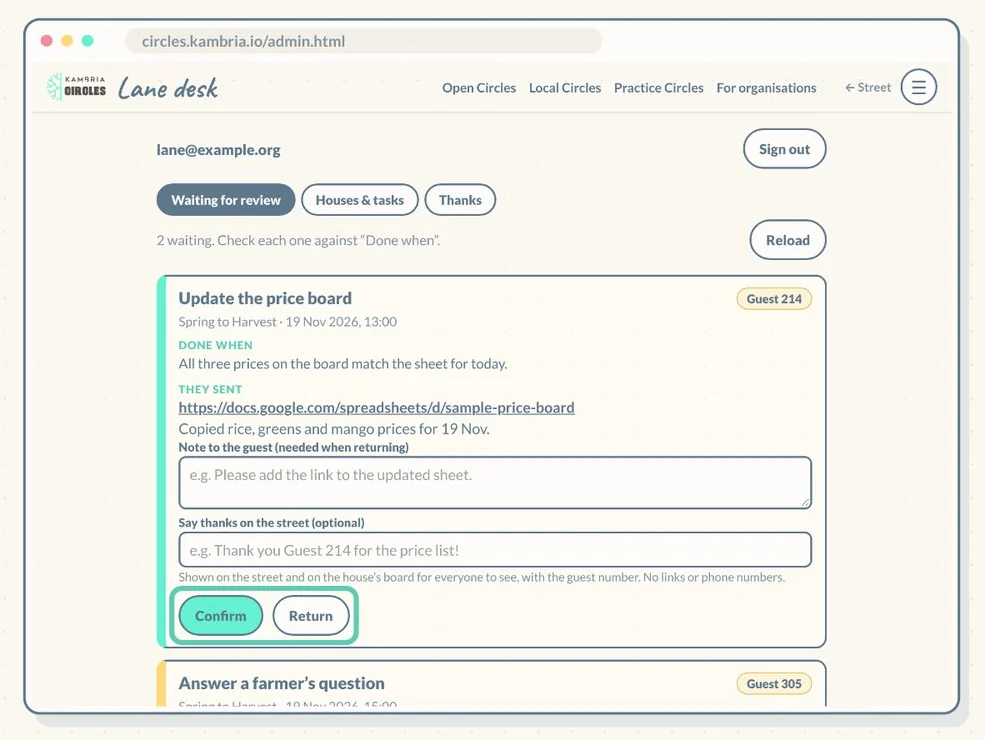
- Sign in to the Lane desk and open Waiting for review. The top line says, for example, 2 waiting. Check each one against “Done when”.
- Each card shows the task title, the guest number (for example Guest 214), the house, the time it was sent, Done when, and under They sent the guest's link and note.
- Open the link. Ask one question: does this meet "Done when"? The work doesn't need to be perfect.
- Yes: tap Confirm. The card says Confirmed ✓ A lantern for Guest 214 is now on the thank-you tree.
- You can also write a short public thank-you in Say thanks on the street (optional) before you tap Confirm (see "Say thanks on the street").
- Not yet: write what is missing and how to fix it in Note to the guest (needed when returning), then tap Return. The card says Returned to Guest 214 with your note.
- Tap Reload to see new work. When the list is empty you see Nothing is waiting for review. 🎉
Good to know
- Please review within 3 days: guests are waiting to see their lantern.
- Good note: "Thanks! Please add the link to the updated sheet." Not so good: "Wrong."
- The note can be up to 300 characters. The guest sees it in My tasks (and by email, if they turned that on).
- If the work shows personal details (phone numbers, addresses, photos of people), return it and ask the guest to remove them. If something is spam, rude or unsafe, return it without repeating it and tell an admin.
- You only see work for your own houses. The guest's email is never shown to you.
- If a sponsor matches your house's tasks, your task board shows "Each confirmed task here is matched by …" and, for example, "200 tasks matched · 46 done". Every task you confirm counts for that sponsor, so confirm only work that meets "Done when". Once a week a Circles admin checks a few counted tasks at random and may mark one "Don’t count".
If something goes wrong
- Please write why the task is returned, so the guest knows what to fix. Fill in the note before tapping Return.
- The note is too long (max 300 characters).
- This task was already reviewed or you can’t review it. Reload to see the latest list. Another lane may have reviewed it.
- Submissions can’t be loaded right now. Please try again later.