

For organisations & sponsors
Practice · A village for your group
Updated 21 Nov 2026
This guide helps schools, NGOs and company teams get a private Practice Circles village for their group, and read its ownership report.
Before you start
- Your group has 4 to 12 adults (18 or older) who can take part for the 8 weeks of a season.
- Each person needs their own email address to sign in. Nobody in your group pays a personal fee: your organisation agrees the terms with Kambria.
Steps
- On the Practice Circles page, read For schools, NGOs and teams and tap Send your team. It opens the For organisations page (also in the ☰ menu → For organisations).
- Under Work with us, tap Send your team. An email to circles@kambria.io (or a short form) opens. Say who you are, how many people will take part and which season you would like.
- Agree the contract and invoice with Kambria. This happens outside the website.
- A Circles admin creates your village in the season, with your organisation's name, a village name and the number of places you agreed (4 to 12).
- Your group's lead receives two things from the Circles team: the village's invite code (6 letters and numbers, for example K7M2QX) and the link to your ownership report (circles.kambria.io/village-report.html?k=…). Keep the report link inside your organisation.
- Send the code and the season link to your people. Each person opens the season page, signs in with their email, ticks I’m 18 or older, taps Join the season, then types the code in Village code under Join your team’s village and taps Join with code (see "Join a season and a village" under Practice · Learners).
- Open the report link at any time, during or after the season. No account is needed.
- Read the report:
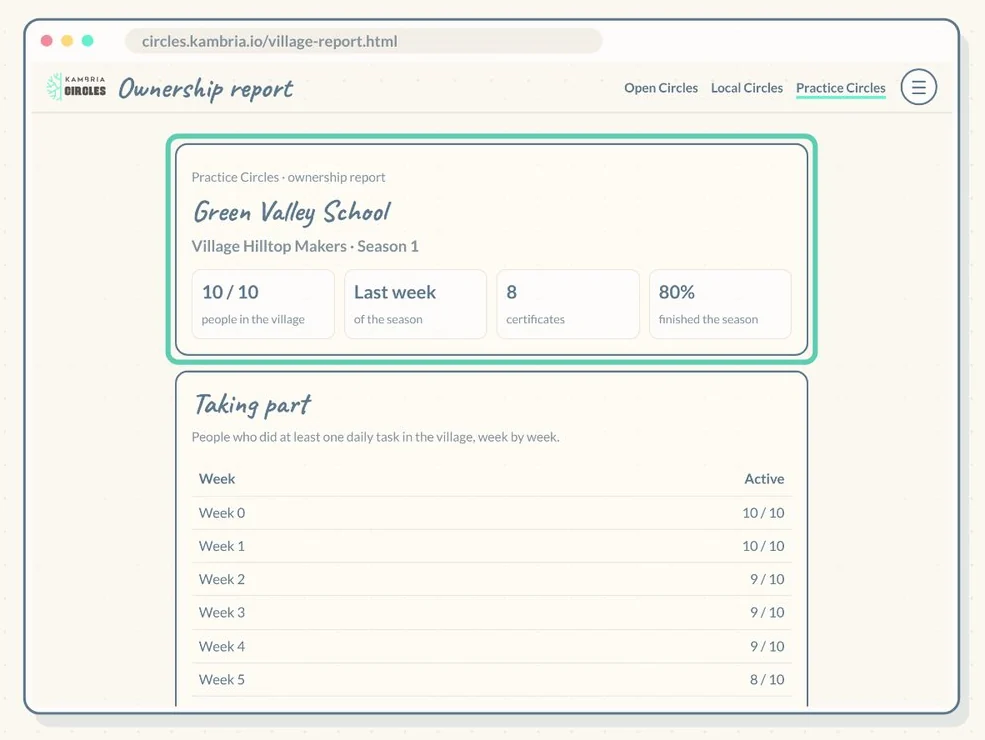
- At the top: your organisation, the village and season, then people in the village (for example 10 / 10: people who joined, out of your places), where the season is (Not started, Week 3 or Last week), certificates, and finished the season (certificates out of people).
- Taking part: for each week, how many people did at least one daily task in the village.
- Taking ownership: proposals made, proposals passed, the share of people proposed at least once, objections raised and voted on, the share of people held a lane, mini-cycles led (all 5 steps) and artifacts done (each person has 8 weekly documents).
- Self-check: before and after: the average answer to each question on a 1–5 scale, before the season and after it. Averages show only from 3 answers; nobody's own answers are shown.
- Note from the facilitator: a few lines on how the group grew, when the facilitator wrote one and the Circles team chose to show it.
- Tap Print / Save as PDF to print the report or save it as a file. It fits A4.
Good to know
- The village is private: only people with your code can join, up to the number of places you agreed.
- Your people show as guest numbers in the village. The report shows counts only: never names, emails or anyone's answers.
- A facilitator from Kambria walks with your village. Talk happens on the village's Discord channel; the website has no chat.
- The website takes no payment, and keeps nothing you write in the email or form.
- Anyone with the report link can read the report. If it was shared by mistake, ask the Circles team for a new link: the old one then stops working.
If something goes wrong
- This report link doesn’t work. Ask the Kambria Circles team for a new one. The link is incomplete, or a new link was made. Write to circles@kambria.io.
- "This village already has 10 people." All places are taken. Ask the Circles team for more places (up to 12).
- "We couldn’t find that village. Check the code." Check the 6 letters and numbers.
- The button doesn't open an email: your device may have no email app. Write to circles@kambria.io yourself.